Introduction
tRPC Platform is a set of tools for working with tRPC. It seeks to solve the following problems:
-
Detecting changes to your router: When you make changes to your router, you want to be able to detect if there are any changes that you haven't explicitly approved.
-
Generating code from your router: You want to be able to generate code from your router, such as output schemas for validation.
Installation
Install this package as a dev dependency in your project:
pnpm install -D trpc-toolspnpm install -D trpc-toolsConfiguration
Add a configuration file in the root of your project:
// trpc.config.ts
import { defineConfig } from "trpc-tools";

import type { AppRouter } from "./router";

export default defineConfig({
  router: {} as AppRouter,
});
// trpc.config.ts
import { defineConfig } from "trpc-tools";
import type { AppRouter } from "./router";
export default defineConfig({
router: {} as AppRouter,
});Custom types
If your router uses custom types (Dinero, Temporal, etc...), you have 2 options:
- leave things as-is
- registerring custom types in your config
Leaving things as is
This will work, although you'll get a very verbose output where the compiler will dig down that custom type and retrieve all the nested properties and methods:
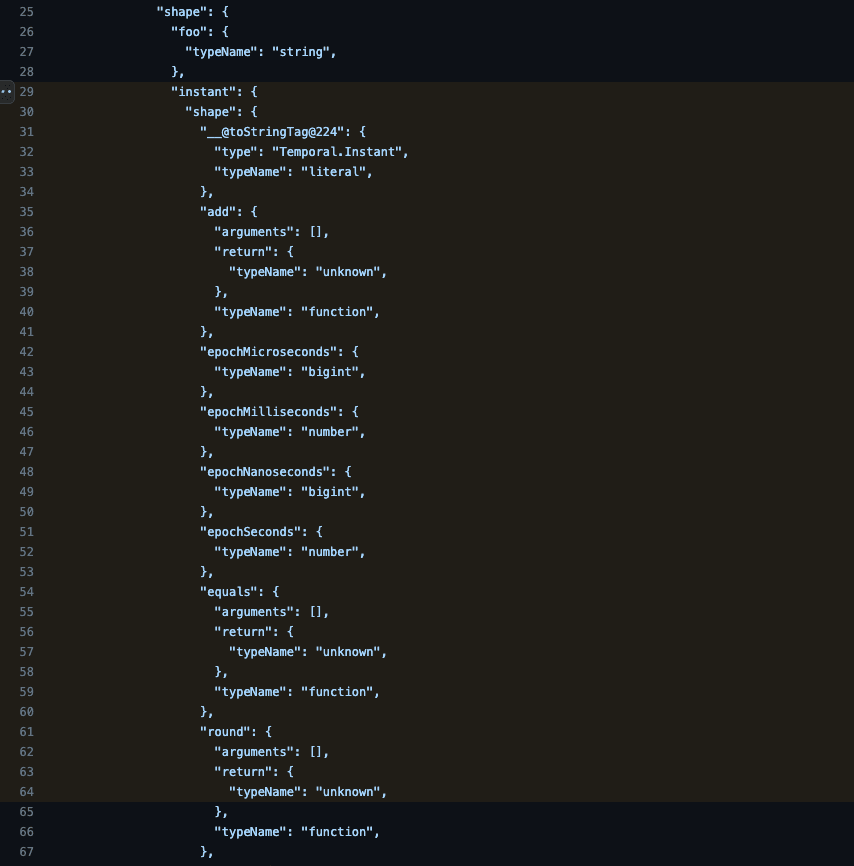
You might also get some false positives when it comes to schema drifting, as some internal typescript id's may change between different runs (e.g. __@toStringTag@224 might change to __@toStringTag@342 without the type actually changing)
Registerring custom types
By registerring custom types to trpc-tools, we can escape those types and output a much less verbose diff:
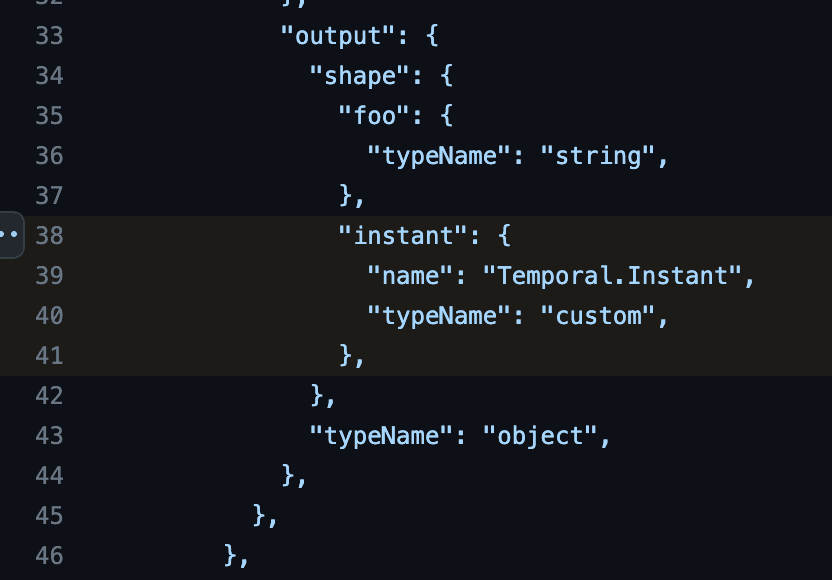
Registerring types is done by appending them as a key-value pair under customTypes when you define your configuration:
import { Temporal } from "@js-temporal/polyfill";
import { defineConfig } from "trpc-tools";

import type { AppRouter } from "./router";

export default defineConfig({
  router: {} as AppRouter,
  customTypes: {
    "Temporal.Instant": Temporal.Instant,
    "Temporal.PlainDate": Temporal.PlainDate,
  },
});
import { Temporal } from "@js-temporal/polyfill";
import { defineConfig } from "trpc-tools";
import type { AppRouter } from "./router";
export default defineConfig({
router: {} as AppRouter,
customTypes: {
"Temporal.Instant": Temporal.Instant,
"Temporal.PlainDate": Temporal.PlainDate,
},
});If your type isn't a valid runtime object, you can use typecasting, e.g.
Dinero: {} as Dinero<any>.
Note when registerring generic custom types
If your registerred type is generic, you can't register only a subset of that type, you register either the full master type or you don't register it at all. What do we mean by that? Let's use dinero.js as an example:
Deep dive example
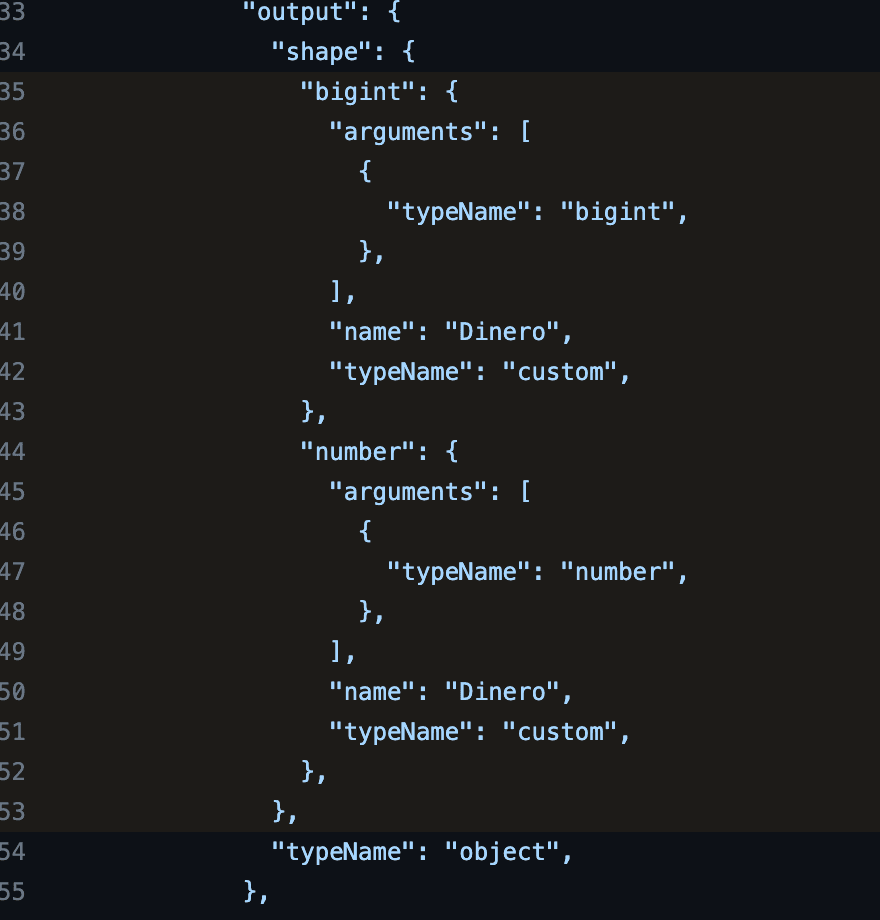
Dinero is a generic library for handling money amounts. By default, it uses number, but you can also use BigInt (or any other number format for that matter). What we mean by "you can't register only a subset of that type", is that you cannot register Dinero<number> but not Dinero<bigint>. trpc-tools only looks at the symbol Dinero when deciding if the symbol is custom registerred or not, and doesn't care about any generic type arguments.
That said, you won't lose the type arguments of the type. They will still be specified in the schema:
and if you later change your calculator from, for example, number to bigint, you'll get a diff warning you that the type argument changed:
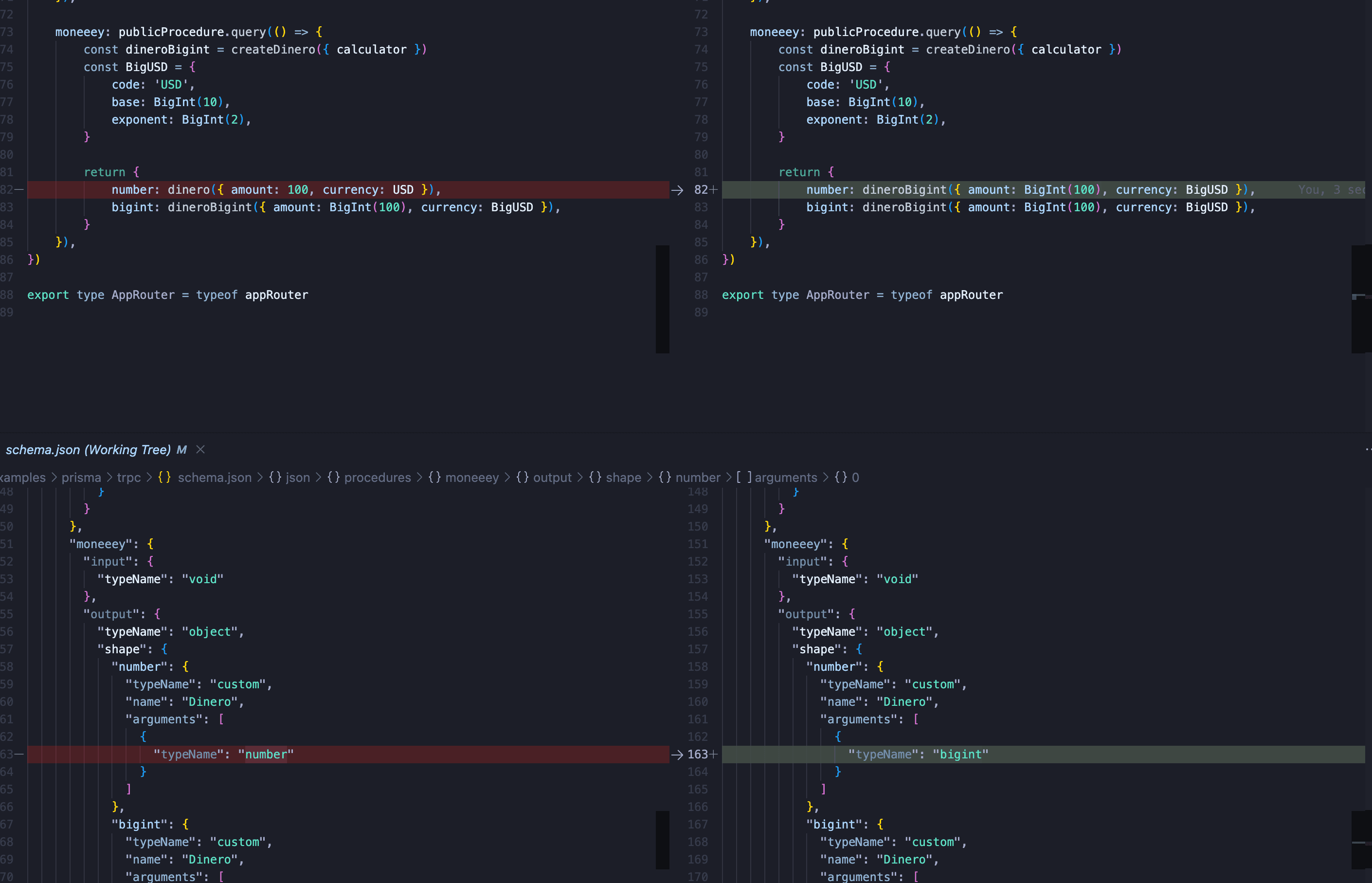
For that reason, we advise you to pass any as the type argument when registerring the type, and not specifying what underyling number format your calculator is using:
import { Dinero } from "dinero.js";
import { defineConfig } from "trpc-tools";

import type { AppRouter } from "./router";

export default defineConfig({
  router: {} as AppRouter,
  customTypes: {
    // ❌ Don't do this, you can get arbitrary results for different runs
    DineroNumber: {} as Dinero<number>,
    DineroBigInt: {} as Dinero<bigint>,

    // ✅ Instead, just specify `any`. The type argument will still be captured in your schema
    Dinero: {} as Dinero<any>,
  },
});
import { Dinero } from "dinero.js";
import { defineConfig } from "trpc-tools";
import type { AppRouter } from "./router";
export default defineConfig({
router: {} as AppRouter,
customTypes: {
// ❌ Don't do this, you can get arbitrary results for different runs
DineroNumber: {} as Dinero<number>,
DineroBigInt: {} as Dinero<bigint>,
// ✅ Instead, just specify `any`. The type argument will still be captured in your schema
Dinero: {} as Dinero<any>,
},
});Next steps
You're all set now! Read about the different tools here: